Quoting in multiple currencies
With Multi-currency enabled, the currency selected on the Organization page for a customer is automatically used for all customer-facing documents, including quotes, quote emails, invoices and invoice emails.
- Each quote item's Unit Price, Adjusted Unit Price, and Extended Price are stored in both the internal and customer currencies. The internal currency value is initially calculated from the customer currency value when the quote item is created, using the exchange rate at that time.
- When you open the Quote items page again after the exchange rate has changed, a dialog gives you the option to update the internal values based on the current exchange rate.
- When you create or edit a subscription, the Subscription Period Price and the Subscription Total Price are displayed in the customer currency of the customer associated with the device.
Refer to Assigning a currency.
 What happens when a product procured in a foreign currency is added to a quote?
Quoting is not impacted, because the Unit Cost is displayed and stored in your internal currency.
- When a product is selected in the Item Name field, the unit cost applied to the quote item is determined by the cost accounting option selected in the inventory system setting When quoting or creating charges for inventory products, use the following unit cost (note: if On Hand = 0, the Product's unit cost will be used). Items procured in a different currency are added to your inventory using the stored internal currency values.
- If purchase order item values are used in this calculation, the saved internal currency values of the purchase order items are applied.
How to...
Create a quote in a customer currency
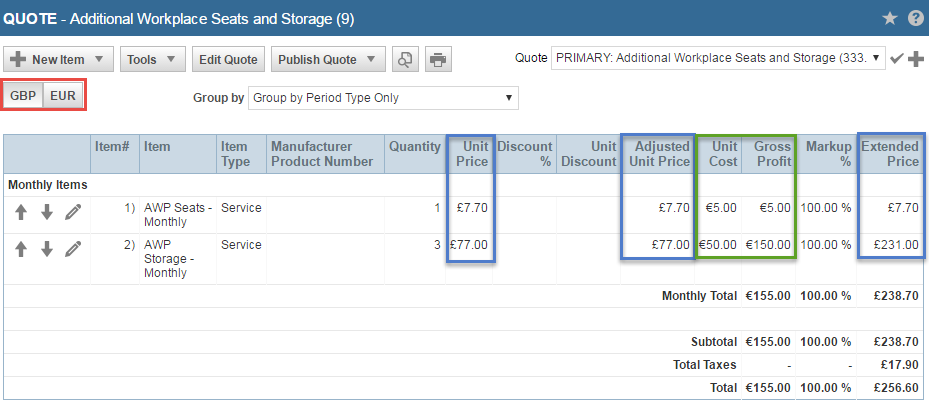
With Multi-currency enabled, you will see a Currency Display Toggle Button that lets you toggle between displaying the quote items in the customer currency (default), or the internal currency.
- When the customer currency is selected, all currency columns display in customer currency except Unit Cost and Gross Profit.
- When the internal currency is selected, all currency values display in internal currency.
The currency selection only affects the display on this page; it does not determine the currency on the published quote.
General information about creating a quote and adding quote items can be found in the following topics:
View a quote preview or a published quote
All currency values on the quote preview and the published quote are displayed in the customer currency only.


