Kaseya Intelligence: Smart Writing Assistant
 Security and navigation
PERMISSIONS Security level with Admin Feature Access permission to Kaseya Intelligence.
NAVIGATION Left Navigation Menu > Admin > Admin Categories > Automation > Kaseya Intelligence > Smart Summaries
IMPORTANT Kaseya Intelligence features are included with a Kaseya 365 Ops, ITSM +, and Ultimate Autotask subscriptions. Refer to Upgrading to ultimate for more information.
Overview
Smart Writing Assistant offers two core capabilities right inside the ticket note and email editor:
-
Generate from Scratch
Describe what you want to say in a few words, and Smart Writing Assistant drafts a complete, professional response. Choose the tone and format that fits the situation:
-
Tone options: Professional, Friendly, Empathetic, Direct, Technical
-
Format options: Paragraph, Bullet Points, Step-by-Step Instructions, Email
-
-
Refine Existing Text
Already have a draft? Highlight it and let the assistant improve it:
-
Improve Writing: enhance clarity, grammar, and flow
-
Make Shorter: tighten a long response into a concise message
-
Make Longer: expand a brief note with more detail and context
-
Simplify Language: reduce jargon for non-technical audiences
-
Translate: convert your message into another supported language. Refer to Other Available Languages.
-
All suggestions appear inline. Technicians review the output and accept, edit, or regenerate before sending.
Why It Matters
| Challenge | How Smart Writing Assistant helps |
|---|---|
| Inconsistent communication quality across the team | Every technician gets AI-assisted writing that meets a professional standard |
| Crafting difficult messages (outage updates, escalation responses) | Tone-aware drafting helps strike the right note for sensitive situations |
| Non-native English speakers on the team | Language refinement and translation lower the communication barrier |
| Technicians spend too long wordsmithing | A polished draft in seconds means more time on the actual work |
Key Benefits
-
Professional every time: consistent tone and quality regardless of who's writing
-
Built into the workflow: no switching to external tools; write and refine right inside the ticket
-
Technician-controlled: AI suggests, humans decide and every response is reviewed before it's sent
-
Multilingual support: write in one language and translate to another, broadening your team's reach. Refer to Other Available Languages.
-
Faster response times: reduce average reply time without sacrificing quality
Enabling / disabling Smart Writing Assistant
To enable or disable Kaseya Intelligence smart summary settings:
-
Navigate to Left Navigation Menu > Admin > Admin Categories > Automation > Kaseya Intelligence > Kaseya Intelligence Settings.
-
Toggle the Enable Kaseya Intelligence button.
-
Select the Smart Summaries tab.
-
Select the check box next to Smart Writing Assistant to enable or disable.
-
Click Save Changes.
Where is Smart Writing Assistant visible?
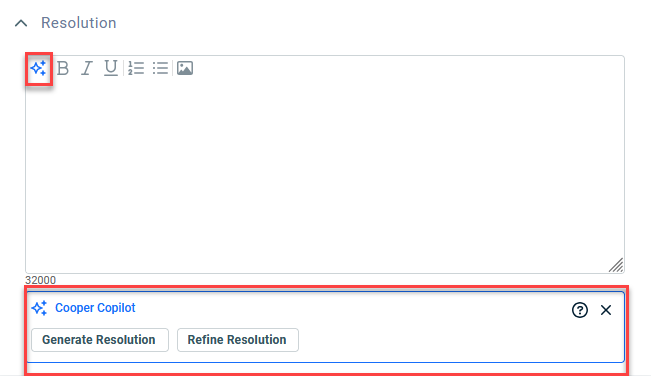
Smart Writing Assistant is available when creating or editing a Ticket Note, Time Entry. To show or hide the available options, click the icon.
icon.
Summarize Notes
-
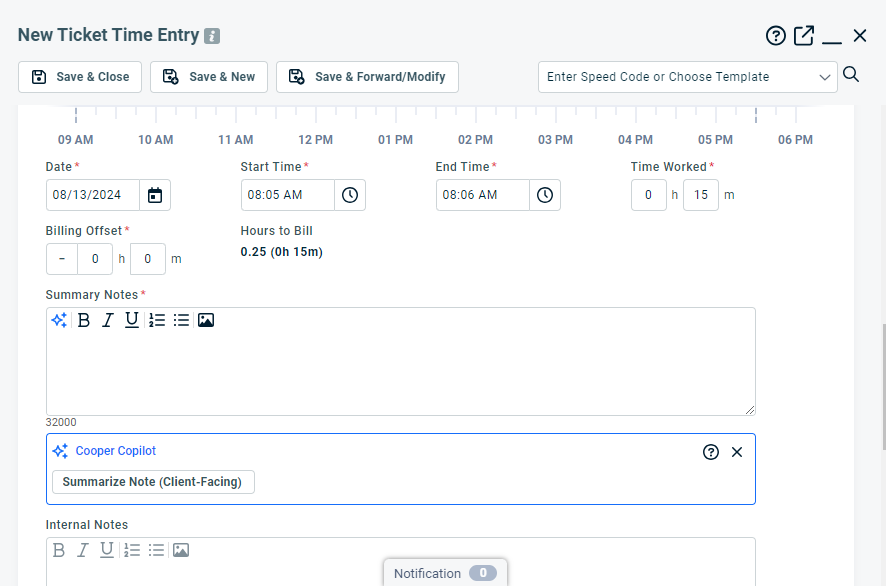
From an open ticket, click New Time Entry or New Note.
-
Add your notes in the Summary Notes or Description and complete all other required fields.
-
Click Summarize Notes (Client-Facing).
-
Select if you want to Append or Replace your current notes with the new Smart Writing Assistant text.
-
Click Save & Close to confirm all changes.


